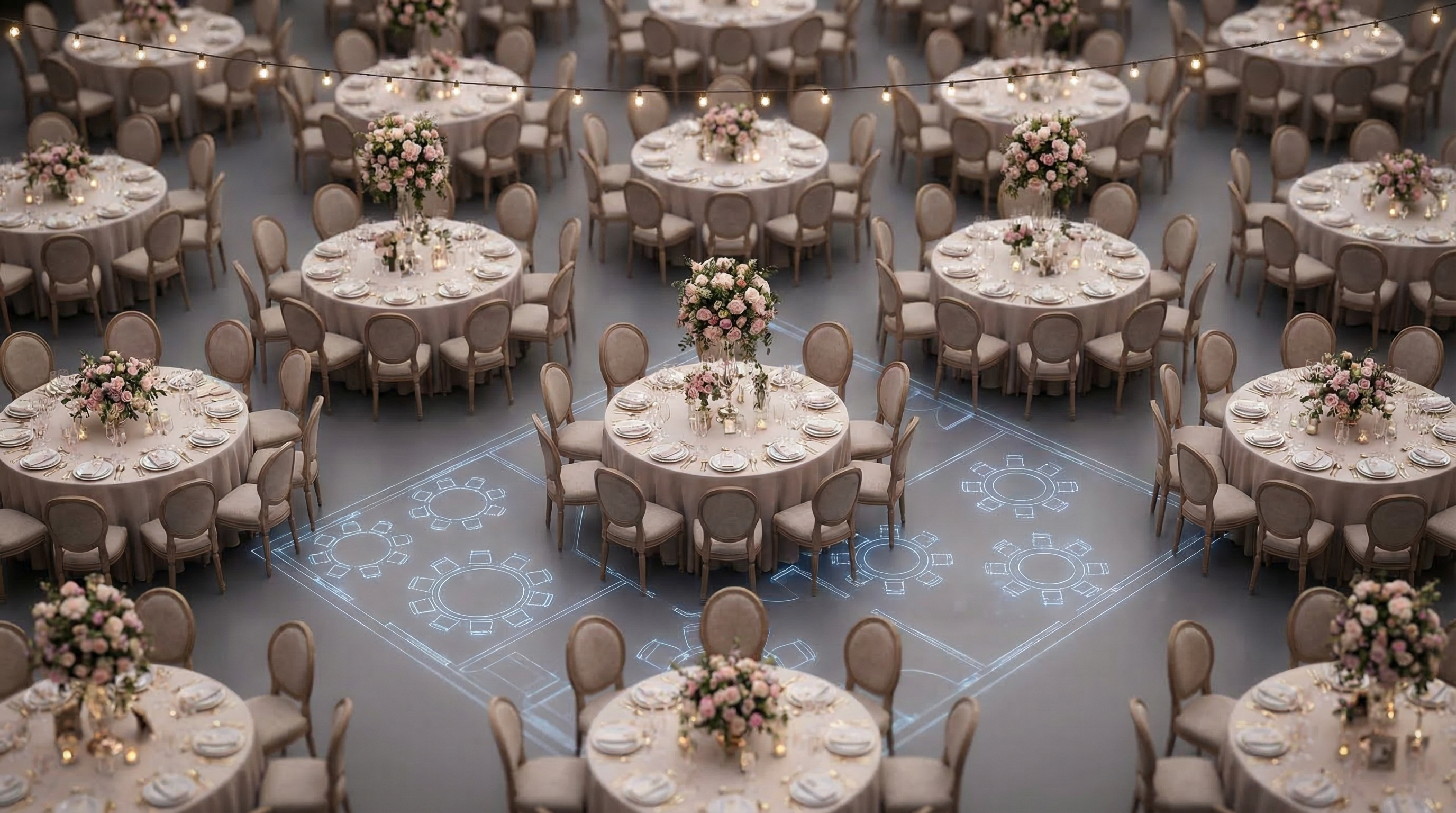
Capacity Calculator: The Visual Guide You've Been Searching For
Planning an event, whether it's a wedding, a corporate conference, or a lively party, involves countless details. But there's one crucial element that can make or break your event's success: venue capacity. Overestimate, and your event feels empty and lacks energy. Underestimate, and you'll have cramped guests and potential safety hazards. A capacity calculator helps you determine the perfect number of attendees for your chosen venue, ensuring a comfortable and enjoyable experience for everyone. This guide will delve into the world of capacity calculators, providing you with a visual, step-by-step approach to mastering this essential event planning tool.
This comprehensive guide will not only explain how to use a capacity calculator, but will also provide critical insights into optimizing your event layout, understanding space requirements, and avoiding common pitfalls. Get ready to transform your event planning process!
Key Takeaways
- A capacity calculator helps determine the ideal number of attendees for a venue.
- Understanding space requirements and layout options is crucial for event success.
- Using a visual floor plan tool like EventFloorPlanner.com enhances accuracy and planning efficiency.
Why is Venue Capacity So Important?
Venue capacity isn't just a number; it's the foundation upon which you build a successful event. Getting it right impacts everything from guest comfort to overall ambiance and even safety. Imagine attending a concert where you're packed like sardines – not a pleasant experience, right? Conversely, a cavernous room with only a handful of attendees can feel awkward and lifeless.
Consider these key aspects:
- Comfort: Adequate space allows guests to move freely, mingle, and enjoy the event without feeling crowded.
- Ambiance: The right number of attendees creates a vibrant and engaging atmosphere.
- Safety: Overcrowding can lead to safety hazards, making it difficult for guests to evacuate in case of an emergency. Fire codes and local regulations often dictate maximum capacity for safety reasons.
- Budget: Accurate capacity planning helps you optimize catering, staffing, and other essential services, preventing overspending.
Ignoring venue capacity can have serious consequences. Don't let poor planning ruin your event! Using a capacity calculator as a starting point is essential to preventing these problems.
Understanding the Different Types of Capacity Calculators
Not all capacity calculators are created equal. Some are simple formulas, while others are more sophisticated tools that consider various factors affecting space usage. You need to choose the right one for your needs.
Here's a breakdown of common types:
- Square Footage Calculators: These are the most basic, dividing the total square footage of the venue by a standard number of square feet per person (varying based on event type and seating arrangements).
- Seating Arrangement Calculators: These consider different seating styles (theater, classroom, banquet) and calculate capacity based on the number of seats that can fit in the space.
- Activity-Based Calculators: These go beyond seating and factor in space needed for activities like dancing, buffet lines, or exhibition booths.
- Online Floor Plan Tools: The most advanced option, these tools, like EventFloorPlanner.com, allow you to visually create a floor plan and automatically calculate capacity based on chosen layouts and dimensions.
The best choice depends on the complexity of your event. For a simple seated dinner, a seating arrangement calculator might suffice. But for a dynamic event with multiple activities, a visual floor plan tool is invaluable.
Step-by-Step: Using a Square Footage Capacity Calculator
Let's walk through a practical example of using a simple square footage capacity calculator.
Measure the Venue
Accurately measure the length and width of the event space in feet. Multiply these two numbers to get the total square footage.
Determine the Square Feet Per Person
This depends on the event type. Here are some common guidelines:
- Standing room only: 6 sq ft per person
- Cocktail reception: 8 sq ft per person
- Theater-style seating: 8-10 sq ft per person
- Banquet seating: 10-12 sq ft per person
- Dinner with dancing: 12-15 sq ft per person
Calculate the Capacity
Divide the total square footage by the square feet per person. The result is your estimated capacity.
Example: You have a venue that measures 50 feet by 40 feet. This gives you a total of 2000 square feet. You're planning a banquet-style dinner, so you'll use 12 square feet per person. 2000 sq ft / 12 sq ft/person = 166 guests (approximately).
Remember, this is a basic calculation. Factors like stage size, dance floor, and buffet tables need to be considered separately and subtracted from usable square footage.
Step-by-Step: Using EventFloorPlanner.com for Capacity Planning
EventFloorPlanner.com simplifies capacity planning with its intuitive drag-and-drop interface and automatic calculations.
Create Your Account (Optional) or Start a New Design
While EventFloorPlanner.com is free to use without an account, creating one allows you to save your designs. Start with a blank canvas or choose from our free templates.
Draw Your Venue
Use the drawing tools to create an accurate representation of your venue's dimensions. Input the length and width of the space. You can also add walls, doors, and windows.
Add Furniture and Fixtures
Drag and drop tables, chairs, stages, bars, and other event elements onto your floor plan. EventFloorPlanner.com offers a wide range of customizable objects.
Arrange Your Layout
Experiment with different layouts to optimize space and flow. Consider factors like sightlines, traffic patterns, and accessibility.
Calculate Capacity
Once your layout is complete, EventFloorPlanner.com automatically calculates the estimated capacity based on the objects you've placed and the space they occupy. You can adjust the layout and recalculate as needed.
Using a visual tool like EventFloorPlanner.com provides a much more accurate capacity estimate than a simple square footage calculation. It allows you to see how the space will actually be used and make informed decisions about your guest list.
Tips for Optimizing Your Event Layout
Simply knowing the capacity isn't enough. You need to design a layout that maximizes space, promotes flow, and enhances the overall guest experience.
Here are some layout optimization tips:
- Consider Traffic Flow: Create clear pathways for guests to move easily between different areas of the event. Avoid bottlenecks.
- Maximize Seating Efficiency: Choose seating arrangements that optimize space. For example, round tables generally accommodate more people than rectangular tables in the same area.
- Utilize Vertical Space: Use decorations and lighting to draw the eye upward and make the space feel larger.
- Designate Zones: Clearly define different areas for specific activities, such as dining, dancing, and socializing.
- Prioritize Accessibility: Ensure that the layout is accessible to guests with disabilities, including wheelchair users.
Understanding Space Requirements for Different Event Elements
Accurately calculating capacity requires understanding the space needed for various event elements. Failing to account for these can lead to overcrowding and discomfort.
Here's a guide to common space requirements:
- Tables: Allow at least 2.5 feet between tables for comfortable seating and movement.
- Chairs: Each chair typically requires 2-3 feet of space.
- Buffet Lines: A single-sided buffet line needs at least 4 feet of width, while a double-sided line requires 8 feet.
- Dance Floor: Allocate at least 4 square feet per dancing couple.
- Stage: Stage size depends on the number of performers and equipment. Allow ample space for movement and visibility.
- Bar Area: A standard bar needs at least 8 feet of length and 4 feet of depth.
Remember to add extra space for servers, performers, and other event staff.
Capacity Calculator Examples: Weddings and Corporate Events
Let's look at two examples of how a capacity calculator can be used in different event scenarios.
Wedding Reception: You're planning a wedding reception for 150 guests in a venue with 3000 square feet. You want a banquet-style dinner with a dance floor and a small stage for the band. Using EventFloorPlanner.com, you can create a layout that includes tables, chairs, a dance floor, and a stage. The tool will calculate the remaining usable space and confirm whether your 150-guest count is feasible without overcrowding. You can then adjust the layout to optimize space and ensure a comfortable experience for everyone.
Corporate Conference: You're organizing a corporate conference for 200 attendees in a venue with 4000 square feet. The event includes a general session with theater-style seating, breakout sessions in smaller rooms, and a networking reception. Using a capacity calculator and floor plan tool, you can determine the appropriate room sizes for each session and create layouts that accommodate the required number of attendees. This ensures that all attendees have a comfortable and productive experience.
Common Mistakes to Avoid When Using a Capacity Calculator
While capacity calculators are valuable tools, it's essential to avoid common mistakes that can lead to inaccurate estimates and planning errors.
Here are some common pitfalls:
- Ignoring Non-Seated Areas: Failing to account for space needed for buffet lines, bars, registration tables, and other non-seated areas.
- Overlooking Obstacles: Not considering pillars, low-hanging fixtures, or other obstacles that can restrict movement and reduce usable space.
- Neglecting Accessibility Requirements: Failing to provide adequate space for wheelchair users and other guests with disabilities.
- Using Inaccurate Measurements: Using estimated or rounded measurements instead of precise measurements.
Always double-check your calculations and use a visual floor plan tool to confirm that your layout is feasible and comfortable.
Expert Tips for Accurate Capacity Planning
Take your capacity planning to the next level with these expert tips:
- Conduct a Site Visit: Physically visit the venue to assess the space and identify potential challenges.
- Consult with Event Professionals: Seek advice from experienced event planners or venue managers who can provide valuable insights.
- Factor in Contingency Space: Add a buffer of extra space to accommodate unexpected guests or last-minute changes.
- Use a Combination of Tools: Combine square footage calculations with visual floor plan tools for a more comprehensive assessment.
- Get Feedback: Solicit feedback from previous attendees or event organizers to identify areas for improvement.
"The biggest mistake event planners make is underestimating the amount of space needed for each guest. Always err on the side of caution and provide ample room for movement and interaction." - Event Manager Blog
"Don't just rely on the venue's stated capacity. Consider your specific event needs and create a detailed floor plan to ensure a comfortable and safe environment for your guests." - The Knot
"Accurate capacity planning is essential for a successful event. Use a combination of tools and techniques to determine the ideal number of attendees and create a layout that maximizes space and flow." - Cvent
Before You Start
- Gather accurate venue dimensions.
- Determine the type of event and activities.
- Identify any potential obstacles or limitations in the space.
Frequently Asked Questions
Written by
Event Floor Planner Team
Helping event planners create stunning floor plans and seating charts for weddings, corporate events, and special celebrations.
Stay in the Loop
Get expert event planning tips, layout ideas, and exclusive guides delivered weekly.
No spam. Unsubscribe anytime.
Related Articles
Why 11% of Couples Get Vineyard Wedding Setup Wrong (And How to Fix It)
Vineyard Wedding Setup: Avoid the 11% Pitfall Dreaming of saying "I do" amidst rolling hills of grapevines, bathed in golden sunlight? A vineyard wedding offers undeniable charm and rustic eleg...
Intimate Wedding Setup Made Easy: a Step-by-Step Guide
Intimate Wedding Setup Made Easy: A Step-by-Step Guide Planning an intimate wedding? You're likely envisioning a celebration filled with close friends, family, and deeply personal touches. But cre...
13 Wedding Gift Table Setup Ideas That'll Make Your Guests Say WOW
13 Wedding Gift Table Setup Ideas That'll Make Your Guests Say WOW Your wedding day is a celebration of love, and your wedding gift table setup is the perfect way to display the generosity of yo...